Pet portraits
A blanket of your own dog
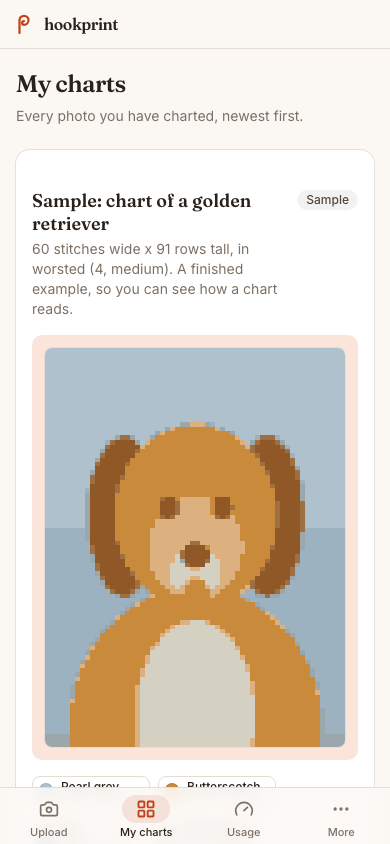
One phone photo of a golden retriever becomes a grid you can set to throw size, with the color key and yarn weight sitting next to it.
From photo to chart
Your photo comes back as a grid chart with its stitch count, color key and yarn weight, and every stitch is yours to change before you export.
The problem
You already know the blanket you want: your dog's face, your grandmother's photograph, the view from the cabin. Getting there means squaring the photo onto graph paper by hand and counting rows for an evening or three, or opening a charting tool that was never built to take a photograph at all. Either way the hook sits on the table while you do arithmetic, and what comes out is often something you cannot change once you see it in yarn.
For what it covers, see the pages this site publishes.
Your photo comes back as a grid chart with its stitch count, its color palette and its yarn weight noted beside it, ready to read row by row.
The editor holds the whole chart. Raise the stitch count for more detail, swap the palette, set a different yarn weight, or fix one stitch on its own.
How it works
Choose a photo on your phone and confirm it is yours to use. Good light and one clear subject keep the detail that survives being squared onto a grid.
Background clutter is set aside so your dog, or your grandmother's face, sits on a plain ground instead of competing with a sofa and a lamp.
The grid arrives with its stitch count, color key and yarn weight, each color shown as a small swatch beside its name and row number.
Set a higher stitch count if the eyes need more room, swap the colors for yarn already in your stash, and edit single stitches by hand.
Save a PDF to print for craft night, or download the chart file and upload it to your own Ravelry library.
Who it is for
For who it covers, see the pages this site publishes.
Pet portraits
One phone photo of a golden retriever becomes a grid you can set to throw size, with the color key and yarn weight sitting next to it.
Family tapestry
Chart a photo of the people in it, then raise the stitch count until the faces read from across the room rather than from arm's length.
Gift makers
Work from a photo the recipient sent you, and have the chart printed before the yarn order arrives.
Stash crocheters
Swap the chart's palette for the colors already in your bins, and set the yarn weight you are actually working with before you count a single row.
Sign up, upload a photo, and the grid comes back with its stitch count, color key and yarn weight. Three charts a month are free.